MT4 vs MT5: Which MetaTrader Platform Fits Your Forex Trading Style?
A reader-friendly comparison of MetaTrader 4 and MetaTrader 5 for forex, gold, indicators, Expert Advisors, and copy trading setup.
MetaTrader 4 and MetaTrader 5 are two of the most common platforms used by retail forex traders. Both can show charts, place trades, run indicators, and support automated tools. The better choice depends on your broker, instruments, strategy, and whether you need a specific Expert Advisor or copy trading setup.
The platform alone does not make a strategy profitable. It simply gives you the tools to execute and monitor trades. Still, choosing the wrong platform can create friction if your broker, account type, or strategy is built for the other version.
Quick Answer
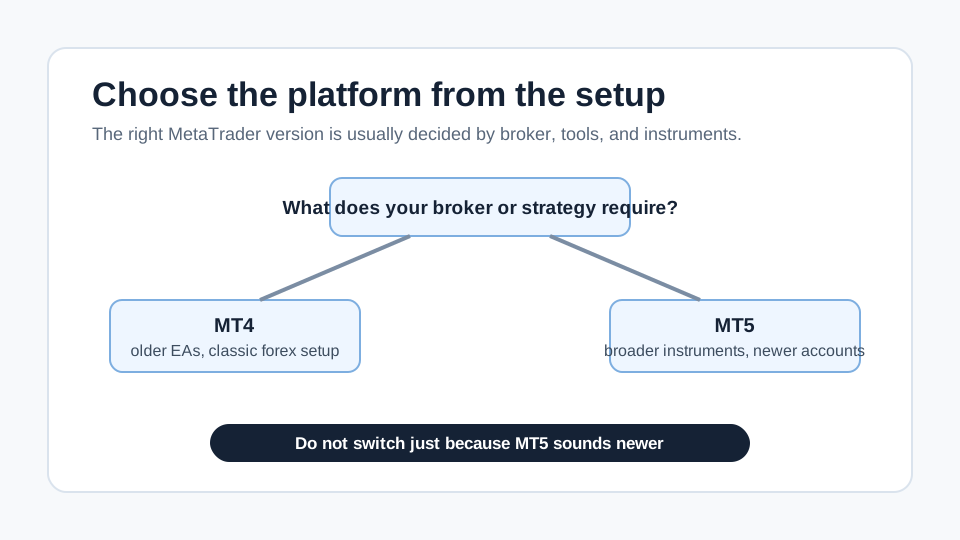
MT4 is still widely used for forex and many older Expert Advisors. MT5 is newer, supports more market types and order features, and is often preferred by brokers expanding beyond classic forex. Choose the platform that supports your broker account, instruments, strategy tools, and copy trading requirements. Do not switch only because one version sounds more advanced.
What MT4 Does Well
MT4 became popular because it is simple, familiar, and widely supported by forex brokers. Many traders already know its interface. Many older indicators and Expert Advisors were built for it. If a strategy provider uses MT4, copying or running the same tool may be easier on MT4 than trying to recreate it elsewhere.
MT4 is often enough for traders who mainly watch forex pairs, place manual trades, or use established indicators. The limitation is that it was built around a simpler market structure, and not every broker offers every newer instrument or account setup through MT4.
What MT5 Does Well
MT5 is newer and was designed for broader market access. Depending on the broker, it can support more asset classes, more order types, more timeframes, and a different strategy testing environment. Some brokers push MT5 for newer accounts, especially when they want one platform for forex, commodities, indices, and other CFDs.
MT5 can be the better choice if your strategy, broker, or instrument selection is built around it. For example, if the account you want uses MT5 and trades gold plus forex pairs, trying to force MT4 may not make sense.
| Feature | MT4 | MT5 |
|---|---|---|
| Common use | Classic forex trading | Forex, CFDs, broader broker offerings |
| Older EAs | Often more available | May need MT5-specific version |
| Timeframes | Fewer built in | More built in |
| Order and market tools | Simple and familiar | Broader toolset in many broker setups |
| Broker support | Still very common | Growing and often preferred for new setups |
| Best choice | When the strategy or EA is MT4-based | When broker, instruments, or tools require MT5 |
The Decision Should Start With the Account
Many beginners compare menus and screenshots first. A cleaner process starts with the account you actually plan to use.
| Decision point | Choose MT4 when... | Choose MT5 when... |
|---|---|---|
| Broker account | The account type you need is MT4-only | The broker requires MT5 for the account type |
| Strategy provider | The provider trades on MT4 | The provider trades on MT5 |
| Instruments | You mainly trade classic forex pairs | You need broader CFD or exchange-style access from your broker |
| Tools | Your indicator or EA is MT4-only | Your tool has a maintained MT5 version |
| Learning resources | Your broker guide is written for MT4 | Your setup instructions are written for MT5 |
| Testing | Existing MT4 tests are enough for your method | You need the MT5 tester features your broker supports |
If the strategy, account, and support material all point in one direction, choose that direction. Platform preference should not fight the setup.
Expert Advisors and Indicators
An Expert Advisor built for MT4 does not automatically work on MT5. The platforms use different languages and architecture. If you buy or follow an automated strategy, check the exact platform version before opening the account.
The same is true for indicators. Many popular tools exist for both platforms, but not all custom tools are available in both versions. If your strategy depends on a custom indicator, confirm compatibility before depositing funds.
Compatibility is not just "does it install?" Ask whether the tool is maintained, whether the settings match the provider's version, whether historical tests were run on the same platform, and whether the broker symbol names match.
Strategy Testing
Backtesting can help you understand how a strategy behaved historically, but it is not proof of future performance. MT5 has a more advanced tester in many setups, while MT4 remains common for older systems. The important point is not which tester looks better. It is whether the test uses realistic spreads, slippage, commissions, and market conditions.
A backtest that ignores costs can make a weak strategy look attractive. A test that uses clean historical data but trades live during messy execution can still disappoint.
Before trusting a test, ask:
| Test input | Why it matters |
|---|---|
| Spread model | Tight fixed spreads can overstate scalping results |
| Commission | Raw spread accounts may charge per lot |
| Slippage | Fast markets can fill worse than the backtest assumes |
| Symbol specification | XAUUSD contract size can differ by broker |
| Data period | A short calm period may miss difficult market regimes |
| Position sizing | Fixed lot tests can hide account growth or drawdown behavior |
Copy Trading Setup
For copy trading, platform choice is usually decided by the broker and provider. If the strategy provider trades MT5, you may need an MT5 account. If the provider uses MT4, an MT4 setup may be required. Some broker copy systems are separate from MetaTrader, while others connect directly through the platform.
On TestedSignals, check the broker and platform notes before connecting. Strategies such as EURUSD Ultima Markets, EURUSD VT Markets, and EURUSD VT Markets should be reviewed for account type, instrument, and execution context. If lot sizing is part of your setup review, use the forex lot size calculator before placing live risk.
Which Platform Should a Beginner Choose?
A beginner should not choose based on hype. Start with the broker and strategy requirements. If your broker offers both and you only want to learn basic forex trading, either platform can work. If you plan to use a specific strategy, choose the platform required by that strategy.
Also consider support. If tutorials, broker instructions, or copy setup steps are written for one platform, using the other can create unnecessary confusion.
Common Mistakes
The first mistake is assuming MT5 is always better because the number is higher. It may be better for your setup, but MT4 may still be correct if your tools are MT4-based.
The second mistake is opening the wrong account type. A broker may offer standard, raw spread, ECN-style, or copy-specific accounts. The platform is only one part of the setup.
The third mistake is ignoring execution. A beautiful platform cannot fix wide spreads, poor fills, or oversized positions.
The fourth mistake is trying to migrate a working setup without a reason. Switching platforms can change symbol names, contract specifications, tester assumptions, and tool behavior. Test first on demo or small live size.
Final Decision Checklist
Before choosing MT4 or MT5, check:
- Which platform your broker supports for the account type you want.
- Which platform your strategy or copy provider uses.
- Whether your instruments are available.
- Whether indicators or Expert Advisors are compatible.
- Whether costs and execution fit the strategy style.
- Whether you can test the setup on demo first.
- Whether broker support can help if the setup fails.
The best platform is the one that fits the trade plan with the least confusion. Everything else is secondary.
FAQ
Is MT5 better than MT4?
Not automatically. MT5 has newer features in many broker setups, but MT4 can still be the better choice when your broker account, indicator, Expert Advisor, or copy trading provider is built for MT4.
Can I use an MT4 Expert Advisor on MT5?
Usually no. MT4 and MT5 tools are built differently, so you need a version made for the exact platform. Do not assume an old MT4 tool can be installed or tested properly on MT5.
Should a beginner start with MT4 or MT5?
A beginner should start with the platform that matches the broker and learning material. If both are available and you only need basic forex trading, either can work. If a strategy requires one version, use that version.
Does platform choice affect copy trading results?
Yes, if the platform changes broker account type, symbol specifications, execution, or provider compatibility. The bigger issue is not the logo on the screen, but whether your account matches the provider setup.
Which is better for copy trading, MT4 or MT5?
Use the platform required by the strategy provider and your broker account. If the provider trades on MT4, forcing MT5 can break Expert Advisor compatibility, symbol specs, or copy-tool setup.
MT4 ou MT5 : lequel choisir pour le forex ?
Choisissez la plateforme supportée par votre broker et votre stratégie. MT4 reste courant pour le forex classique ; MT5 peut être nécessaire si le broker ou les instruments exigent ce compte.
Tags:
Author
TestedSignals Editorial Team
Reviewed by
TestedSignals Risk Review
Next step
Compare verified copy trading strategies
Compare verified forex copy trading strategies with verified performance, broker setup, designed risk, and the Telegram copy link — after the matching broker account is open.